SupplyIQby VlinderGet in touch
Supply-chain document intelligence

Any supply-chain document, read and verified into your systems.

Purchase orders, invoices, delivery notes, customs paperwork — any language, any layout. SupplyIQ extracts the fields you define, scores every value, and shows you the line it came from.
Available on the Microsoft Azure Marketplace
playground.supplyiq.vlinder.io
Extracted fields with confidence scores and source links
Country of origin99%
Ethiopia · Sidamo
Sourced from page 1, line 14 — verified against the original.
Any format
PDF, scan, photo, Excel, email body
Any language
Read in the language it arrives in
No templates
A new vendor layout doesn't break it
Every field scored
Confidence and source on each value
01 — The problem

You've tried templates. You've tried portals. The documents still win.

Templates
break the moment a vendor changes their layout.
Supplier portals
only work if every supplier logs in. The long tail never will.
EDI
covers your largest partners. Not the PDF in someone's inbox.
A generic reader
returns a number with no score and no source. One quiet mistake and trust is gone.

So it falls back to people. Someone opens the file, reads it, types it in — and someone else checks it at month-end.

What that costs · illustrative
~10 hrs
per analyst, per week, retyping documents
~2%
of keyed numbers mistyped — silently, into planning and finance
1–2 days
from "document arrives" to "usable data"
Illustrative figures based on typical manual document handling — not measured customer results.
02 — How it works

One pipeline, from the file that lands in an inbox to a row in your system.

The same five steps for every document. Nothing keyed by hand, nothing delivered without a score and a source.

Step 01
Receive
Inbox, upload or drop folder — however it already arrives.
Step 02
Read
A text engine reads the words. A vision engine reads tables, stamps and scans.
Step 03
Verify
A second pass checks every value and scores it. Low scores are flagged, not guessed.
Step 04
Standardise
Units, currencies, dates and names are mapped onto your master data template.
Step 05
Deliver
Clean rows land in your system, each with its score and a link back to the page.
Typical run: 30 seconds to 1 minute per documentBelow your confidence threshold → a person decides
03 — Why us

Reading the document is the easy part.

Plenty of tools pull text off a page. None arrive knowing your fields, your vendors, your tolerances. The engine is ready on day one; the system around it is what we build with you.

What you get on day one
Text engine, vision engine, confidence scoring, source traceability and export — already running. The next section is how it becomes your system.
A one-size tool
Bolted on top of your operation
Its field names, its formats, its idea of what a purchase order contains. You close the gaps with workarounds, and stop trusting the output.
SupplyIQ
Cut to fit your operation
Your field names, your vendors, your tolerances, your output formats — configured by the engineer who runs the first batch with you.
04 — How we tailor it

Five steps, and you are in four of them.

Run by the engineer who configures your template, not handed to a support queue. One workflow first, widened as it earns trust.

01
Understand your workflow
We map the real flow, not the documented one — what your vendors actually send, where it lands, and the exceptions nobody wrote down.
02
Tailor the fields and the output
Every field your business needs, named your way, and output formats shaped to what your systems expect. Built once with you, then picked per upload.
03
Prove it on your own documents
We run it across your historical documents and hand you a pass rate, plus what it still gets wrong. A number, not a promise.
04
Deploy beside what you already use
Alongside your ERP, portals and spreadsheets. No migration project, no rip and replace.
05
Improve on your corrections
Every correction feeds back. What it hesitates on this month, it handles next month — without us shipping a new product.
Your field names, not oursConfigured with an engineer, not a formChanges stay yours to make
05 — The product

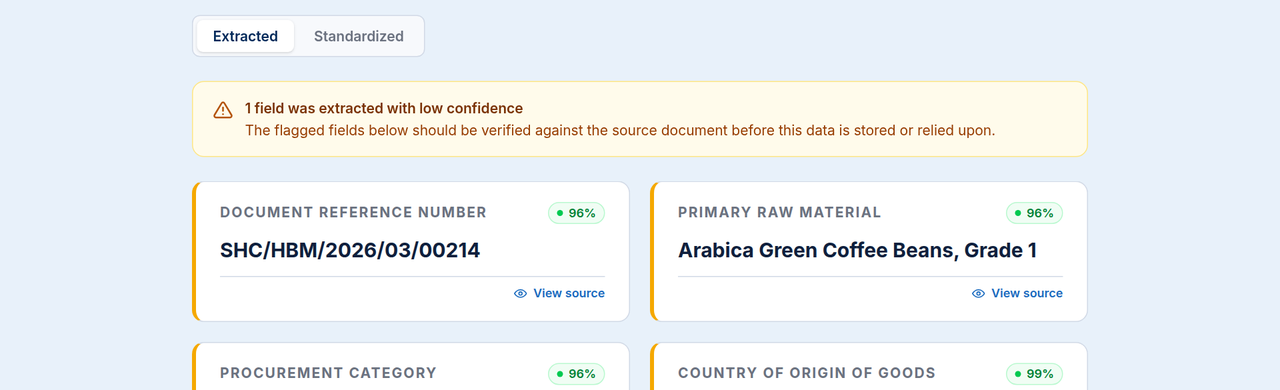
Three screens, one commercial invoice.

A real run on a coffee invoice, exactly as the product renders it today.
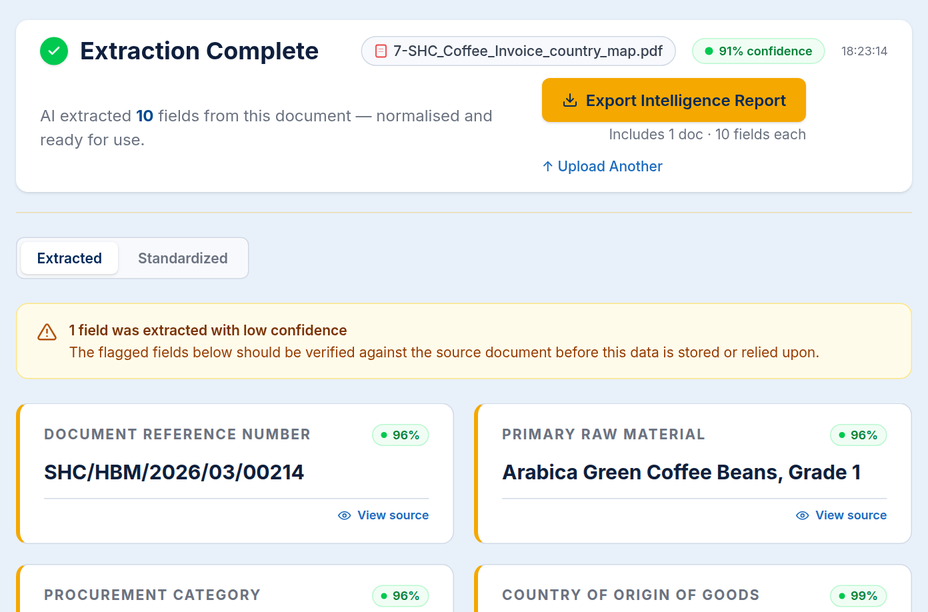
Every value carries a score
Ten fields, each with its own confidence. The weak one is flagged at the top, not buried.
Extracted fields with confidence scores
06 — Verification

A wrong number entered quietly is the worst outcome.

So nothing arrives unmarked. Pick a field to see what sits behind it.

01Scored, not asserted. A second pass checks each value on its own and rates it.
02Traceable. Every value keeps a link to the passage it came from.
03Escalated. Below your threshold it goes to a person, never to a guess.
Commercial invoice · 10 fields1 flagged
Source passage
Document_Reference_Number: SHC/HBM/2026/03/00214
Checked independently of the first read
Illustrative values from a sample coffee invoice.
07 — Master data template

Decide what a document owes you. Once.

Define the full list of fields your business needs, named your way. After that, an upload is just ticking the ones you want this time.
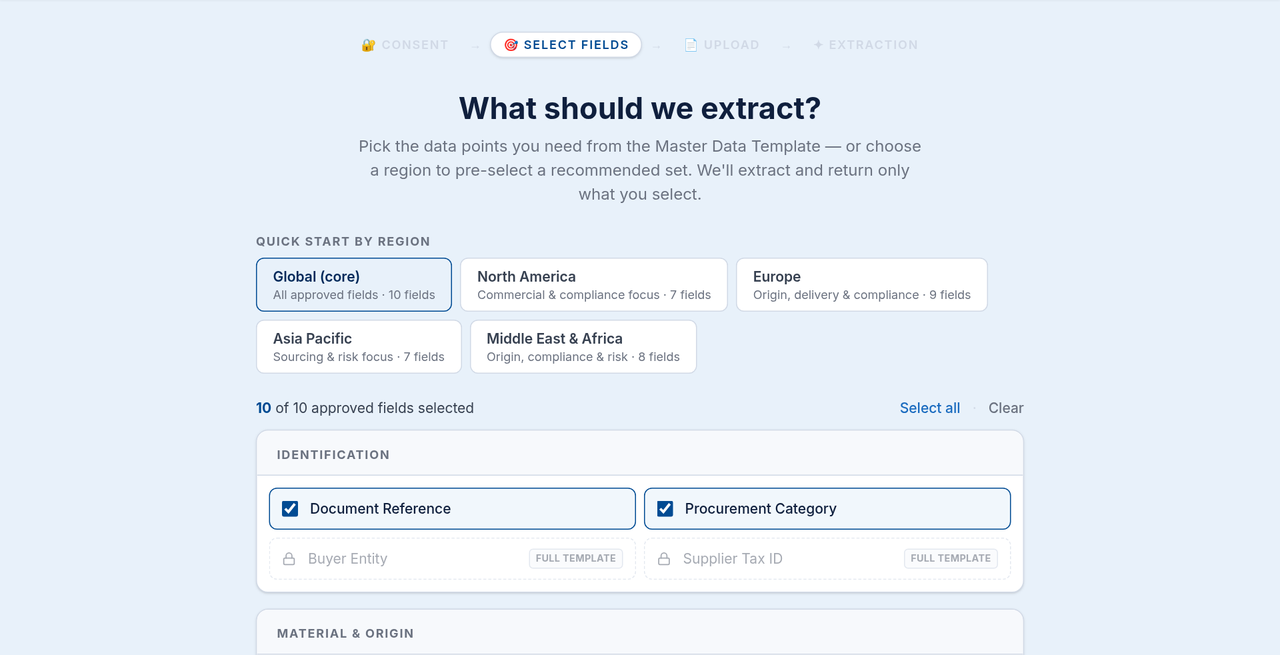
Once, at setup
Your template
Every field you could ever need — a hundred, if that's what it takes — defined with us in your own language.
Every upload
Your pick
Tick the fields that matter for this batch — or load a set your team already saved.
Saved sets, for example
Global coreEuropeNorth AmericaAsia PacificMiddle East & Africa
Illustrative. Your sets are named from your own fields.
Choosing which fields to extract from the master data template
08 — Today and beyond

What's real today, and where we take it with you.

The left column you can use this quarter. The right column is scoped to your operation and built with you.

Live today
  • Any document, no templates — line items, prices, dates, SKUs, scans, charts, maps
  • Standardised units and currency, confidence on every field, one-click source
  • One-click intelligence export as JSON, CSV or Excel
  • Available on Microsoft Marketplace
Your tailored rollout — whatever you need
  • +Pre-configured fields for your documents, custom output formats to match your systems
  • +Straight into SAP or your ERP, automatic three-way match (PO ↔ delivery ↔ invoice)
  • +Voice or extra vision models where they help, vendor scorecards, a live dashboard of hours and errors saved
Scoped in the first session. Nothing here is a waiting list.
09 — Start

Send us five documents. We'll show you the fields.

A short session with the engineer who would configure your template. No slideware.

What to bring
Documents from your two most awkward suppliers
The field names your systems already use
Whoever fixes the data today